I use Docker for all my client work, and most of my personal projects too. I love it. It’s saved me a ton of money because it uses so much less RAM than Vagrant — what I had been using.
Benefits of this config
- Just
docker-compose upto set up and launch the dev environment (Yep, a one-liner likevagrant up– that’s the goal.) - One easy-to-install dependency to get coding on a new computer: Docker. (Versus two complex ones when using Vagrant.)
- A true development-oriented config: Source code is mounted so that changes in the container appear on the host, and vice-versa.
- Fast re-builds because the
DOCKERFILEis written to help Docker cache the images. - Syncing with the Postgres startup delay.
- All the crappy little dependencies installed.
- No weird hacks.
Now the three files, followed by instructions and my comments. Or jump right to the GitHub Repo.
| version: '3.2' | |
| services: | |
| db: | |
| image: postgres | |
| web: | |
| build: . | |
| volumes: | |
| – type: bind | |
| source: . | |
| target: /app | |
| ports: | |
| – "3000:3000" | |
| depends_on: | |
| – db | |
| command: | |
| – ./run.sh |
| # Ruby on Rails Development Environment | |
| FROM ruby:2.5.0 | |
| # Set up Linux | |
| RUN apt-get update | |
| RUN apt-get install -y build-essential inotify-tools libpq-dev nodejs postgresql-client | |
| WORKDIR /app | |
| EXPOSE 3000 |
| #!/bin/sh | |
| set -e | |
| # Ensure the app's dependencies are installed | |
| echo "bundle install –without=production…" | |
| bundle install –without=production | |
| # Wait for Postgres to become available. | |
| echo "Checking for Postgres…" | |
| until psql -h db -U "postgres" -c '\q' 2>/dev/null; do | |
| >&2 echo "Postgres is unavailable – sleeping" | |
| sleep 1 | |
| done | |
| echo "Postgres is available: continuing with database setup…" | |
| # Potentially Set up the database | |
| echo "bundle exec rake db:setup…" | |
| bin/rails db:setup | |
| # Start the web server | |
| echo "bin/rails s -p 3000 -b '0.0.0.0'…" | |
| bin/rails s -p 3000 -b '0.0.0.0' |
How to Dockerize a Rails app
- Copy the three config files to the root folder of an existing Rails project. Make
run.shexecutable, e.g.chmod +x run.sh. - Edit your development database settings to connect to Postgres at host
db, usernamepostgres, password is an empty string. - Spin it up with
docker-compose up.
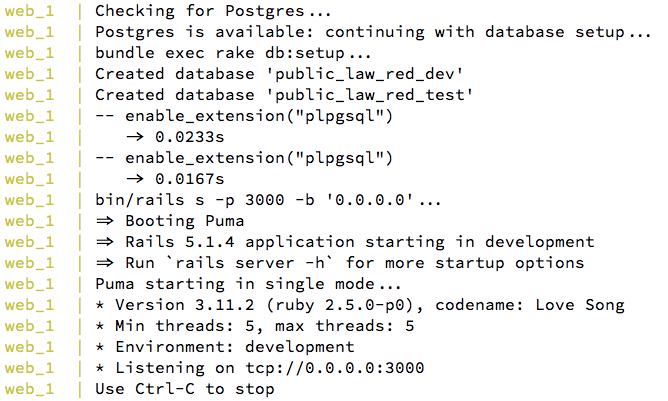
Your Rails app should be up and running at http://localhost:3000. You should see someething like this:
Now a little about this configuration
It’s nearly identical to my Phoenix/Docker config, and so I’ve written a nearly identical blog post.
These files are the result of several hours spent fine-tuning it and going through the Docker file references. I wanted a “online-liner” container-based dev environment; a Docker equivalent of vagrant up. To get this, I read a ton of example configs and got a boost from this excellent post by Alex Kleissner. He had the nice idea of a run.sh script to do some things like synchronize Phoenix startup and Postgres.
Also available as a GitHub repo.


 Dogweather
Leave a reply to Alex J. Ahraus (@fanaugen) Cancel reply