I’ve only ever had iPhones
My last (current) one is a 6s+. I’ve developed and sold an iOS app, and can program in Objective C and Swift. I also have three Mac computers and an older iPad that I still use as an e-reader.
But Apple bugs like this kept me from going 100% into the ecosystem:

Seriously, WTF? Note how the Google web app is rock-solid, but the Apple desktop app is acting like some flaky web app. That was the day I switched to using Google Photos exclusively. So to be fair, I wasn’t 100% in the Apple ecosystem. More like 80%. I’ve got several Linux boxes around because every so often, my Macs just… have issues.
When my iPhone’s screen broke for the second time in just a couple of months, right after dealing with battery-gate, I took the plunge and went all-in on a Google Pixel 2 — the one that’s roughly the size of an iPhone 8:


That’s what it looks like when you order a phone and accessories from Google: pretty nice. Not a ton of padding in the box, but enough. I was wondering how it’d all arrive. What you see there is the phone, a case, the special bluetooth/assistance earphones, and the VR thing. If you get the Google 0% financing, you get 0% on everything you buy at the same time as the phone. So yeah, I loaded up; I wanted the full experience.
I took those pictures in an AT&T store. AT&T doesn’t sell the Google phones, but they list them as compatible.* So I ordered mine unlocked, and opened the thing up right there in the store. It took them about ten minutes to remove the SIM card from my iPhone, place it in the Pixel, and activate it.
* The only change I needed to make started off as a puzzler: At first I was back to 90’s-era dial-in voicemail. It seems that I needed to download AT&T’s “Visual Voicemail” app. At least, that worked for me. Makes sense, I thought: normally, these apps (and other “bloatware”) are pre-installed on phones when you buy them from a carrier. It turns out, according to AT&T chat support, that they do not yet “support” visual voicemail yet on the Pixel 2. (!) Vaguely thinking about switching carriers.


The design of this case and the earbuds is impressive. Note the small green LED; it lights briefly when opening the lid, displaying their charge status. The cord is the perfect length to wrap around and tuck away, exactly like the helpful sticker shows. The clamshell design stays closed magnetically. And even though it’s very light, it feels strong — like it can definitely protect the earbuds when thrown around in my messenger bag.
That’s a USB-C connector, by the way; same as the phone. Not sure yet how I feel about that vs. the Lightning connector on the iPhones. I like having a standardized port, though.
All set up, I started taking notes about the experience with the phone, and quickly saw how big the things I like side was becoming:
Things I Like About the Google Pixel 2
- The experience of installing apps is far better: browsing, purchasing, and installing apps from the phone or a desktop browser at play.google.com. Better user experience, and much faster than the iTunes app.
- Location of the fingerprint reader is on the back of the phone, and it’s brilliant. My fingers are already there, and it’s much more natural to unlock the phone.

- Notifications are far better than what I’m used to. They’re are so good, it’s maybe the killer feature for me:
- The mini-icon line-up at the top of the screen and the lock screen shows the kinds of notifications waiting. Very handy.
- The notifications drop-down, the second way to view them, is an excellent dynamic display and, if left open, updates as new items come in
- There’s a super-easy clear all link which is fantastic and hits at my #1 pet peeve w/ iOS’s design: the iOS notifications give me more work to do, not less: Pulling them up, deleting, tapping, swiping, etc. My iPhone (and Messages) have a long trail of outdated objects I refuse to clear off.
- I’m also getting more kinds of notifications, and for more high-level, interesting things.
- Always-on OLED in lock mode ties in to the notifications, displaying mini-icons and a couple of pieces of important info.
- Universal back function: It’s great having a global “affordance” for the super-common thing that people want to do. It works well, too: its meaning subtly changing in the right way, depending what you’re going back from.
- Cases which completely match the phone’s colors, down to the aqua on/off button.


- Much more transparency about what the phone is doing: how it’s charging, what it’s downloading, etc.
- Elegant solution to the hunting-wifi problem: when out of the house and switching off the wifi, it has a mode where it’ll switch it on when back home. This was always super-annoying with iPhones, and never found anyone who understood it.
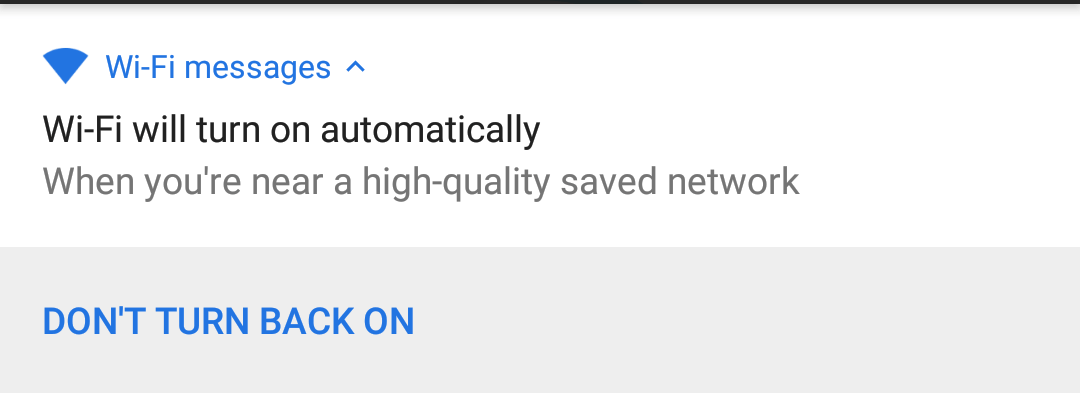
Elegant solution to the hunting-weak-wifi problem And then later, back home…

Automatic wifi control and notifications work together to create a great user experience. I feel simultaneously taken care-of, and still fully in control of the device. That sums up the Pixel 2 experience, I think.
- No force-touch makes everything much simpler: Just short presses and long presses. Maybe I’m in the minority, but I could never remember, for each app, whether to use force touch with it and when. I’m much quicker now on the Pixel 2 e.g. accessing context menus.
- Search/App suggestions that really work: in comparison, the latest iOS versions have broken Siri and app search in certain settings and situations.
- I can place icons where ever I want. I always understood and respected why Apple locks down the phones so much. But they take it way too far. I feel like the Android puts me back in control.
- Daydream VR: is pretty freakin’ amazing, and maybe even life-changing. (I’m totally new to VR.)
- “AR Stickers” are cute and maybe I’ll use them once in a while. I think this is from Star Wars?

- Unboxing experience: as good as Apple
- It lays more flat, even though the camera lens on the back does protrude like the iPhone
- Smart Lock: is a fantastic idea. The phone can stay unlocked in a number of situations. E.g., when I’m still at home, or I’m using the earbuds.
- Google assistant, in the earbuds is amazing, and just generally great.
- Reading a text message to me, letting me reply verbally, and then I dictate to it, and it sends the response.
- Walking me through how to do it.
- All the sounds are better than iOS’s. I never could find a non-jarring iPhone alarm tone. The Pixel 2’s default, “Bright Morning”, is fantastic. The default ring tone is likely superb. This surprised me to be honest. I wasn’t looking for this kind of feature, but I truly appreciate the well designed sound scape.
What I don’t like about the Pixel 2
Definitely a short list:
- Visual Voicemail isn’t seamlessly integrated with the phone app, like it is on the iPhone. It’s possible I haven’t set it up correctly. It’s not a tremendous issue, because AT&T’s voicemail app creates quick appropriate deep-linked notifications when I get a message. UPDATE: This definitely seems to be an AT&T issue with the Google phones.
- I need to find a solution to not having these Mac-only apps on my phone:
- OmniFocus
- Overcast — the highly-rated Castbox is looking pretty darn good, with some excellent features
- Reminders
- Notes for quick & temporary docs, like copy & pasting something from the Mac and being able to pull it up on the phone.
- Must switch manually from bluetooth headphones to bluetooth in my 2013 Subaru. iPhone did that automatically. (Or was that a bug?) When I’d start up the car, the iPhone connects, and the sound switches from the headphones to the car audio. But: the Pixel 2 works fine in “podcast player” mode, whereas my iPhone doesn’t.
Bottom line: the Pixel 2 is a vastly different, and vastly improved experience
All those little features add up: The phone is fun and easy to use. And so far, there’s no serious downside. I mentioned it above; the experience feels simultaneously high-end but also informed and in control. I believe this is a very difficult mix to get right. IMO,
Maybe this sounds naive, but I’m completely surprised by how the product stands on its own. It’s not in the shadow of iOS, not playing catch-up with Apple. I’m continuously seeing common problems solved in new ways.
In contrast, Apple gives me the impression of running on fumes. The devices no longer “simply work”, at least for me. Much of the iOS experience is knowing which things to shut off, and which things to work around.


 Dogweather
Leave a reply to Porgy Cancel reply